
Healthcare Website Templates for Explaining the Steps Between Diagnosis and Treatment
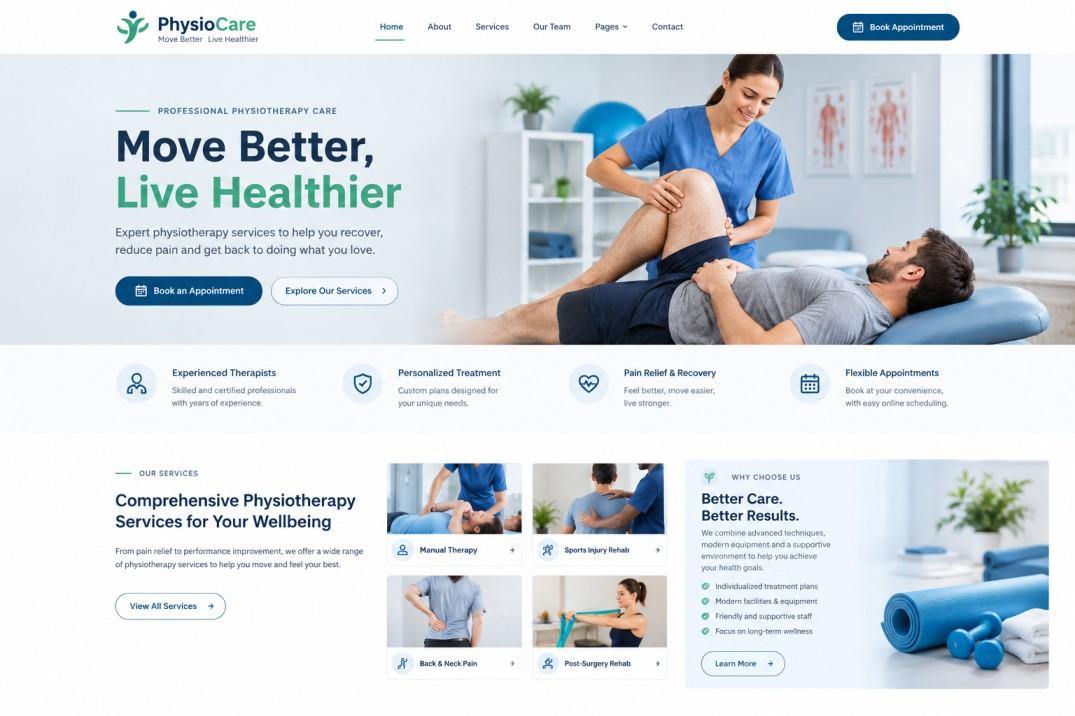
Hearing a diagnosis can be a strange moment. Sometimes it's a relief to finally have a name for the problem. Other times it's a shock. Either way, a lot of patients leave the appointment with the same big question: "So what happens now?" A well-designed physiotherapy website template can help clinics explain treatment plans, outline the next steps, and share useful recovery information so patients have a clearer idea of what to expect.
That gap between being told what's wrong and actually starting treatment is where many people feel lost. They wait for calls, they're unsure about appointments, and they don't always remember what the doctor said. If nobody explains the steps, worry grows.
A good healthcare website can help fill that gap. With the right template and layout, you can show patients the road ahead in plain, calm language. Here's how.
Why This Stage Needs Clear Explanation
Patients Often Forget What Was Said
After hearing a diagnosis, many people take in only a fraction of the conversation. A page on your website that repeats the key steps gives them something to come back to once the shock has settled.
Waiting Feels Longer Without Information
Even a short wait feels endless when you don't know what's happening. Knowing that a referral takes a few days, or that a test result needs a week, makes the wait easier to handle.
Clear Steps Reduce Calls and Confusion
When patients understand the process, they call less often to ask "what's next?" That frees up your staff and keeps the experience smoother for everyone.
Create a Simple "What Happens Next" Page
Make It Easy to Find
Add a menu link or button such as "After Your Diagnosis" or "Your Care Journey." Also link to it from follow-up emails or patient messages, so people don't have to hunt for it.
Show the Journey as a Timeline
A visual timeline works wonderfully here. Picture a line with simple stops:
- Diagnosis and discussion
- Tests or further checks, if needed
- Treatment planning
- Referral or approvals, if needed
- First treatment appointment
- Follow-up and review
Many healthcare templates include timeline or step blocks you can use without any design skills.
Keep Each Step Short and Plain
One or two sentences per step is plenty. Say "We'll book you in for a scan" instead of "Diagnostic imaging will be scheduled." Everyday language is kinder, especially for people who are already anxious.
Explaining the Individual Steps
Further Tests and Checks
Some patients need extra tests before treatment can begin. Explain why they might be needed, roughly how long they take, and how patients will hear about the results.
Treatment Planning
Describe how the doctor or care team decides on the best approach. Let patients know they'll have a chance to ask questions and share their preferences. People feel better when they know they're part of the decision.
Referrals and Approvals
If a patient may need to see a specialist or get insurance approval, say so, and explain what usually happens. A short note about typical timeframes, with a gentle "this can vary," manages expectations.
Starting Treatment
Explain what the first treatment appointment will involve and what to bring or prepare. You can link to your treatment preparation pages for details.
Setting Honest Expectations About Time
Give Rough Timeframes
Where possible, offer ranges such as "Most referrals are processed within five to seven working days." Be honest that things can take longer, and explain what patients can do if they haven't heard back.
Explain Why Waits Happen
A simple line about why some steps take time, such as laboratory processing or specialist availability, helps patients feel less ignored.
Tell Them Who to Contact
Include a clear phone number or contact form specifically for "questions about next steps." Knowing who to ask takes away a big source of stress.
Read More: Healthcare WordPress Theme for Growing Medical Brands
Features That Make the Journey Clearer
Icons and Visual Cues
Small icons for each step, such as a calendar, a document or a stethoscope, make the page easy to scan. They also help patients who find reading difficult.
Short Explainer Videos
A short video from a doctor or nurse walking through the typical journey can be very reassuring. Keep it brief, warm and captioned.
FAQ Sections
Answer common questions in one place: "How long until treatment starts?" "Can I bring someone to appointments?" "What if I'm worried about the cost?" Accordion layouts keep things tidy.
Printable Summaries
A one-page summary patients can print or save helps them share information with family members and keep track of appointments.
Supporting Patients Emotionally
Acknowledge That It's a Lot to Take In
A short, kind line like "Receiving a diagnosis can feel overwhelming, and it's normal to have lots of questions" sets a caring tone. You don't need to say much, just show you understand.
Point to Support Services
If your practice offers counselling, support groups or links to patient charities, mention them. Make these easy to find and optional, so people can choose what feels right.
Encourage Questions
Remind patients that no question is too small. A friendly invitation to get in touch makes a big difference.
Helping Patients Stay Organized
Appointment and Reminder Tools
If your system allows it, send reminders and let patients view upcoming appointments online. Add-to-calendar buttons help too.
Checklists for Each Stage
Short checklists like "Before your test," "Before your referral appointment," or "Before treatment starts" give patients practical things to do, which can ease anxiety.
Keeping Records in One Place
If you offer a patient portal, explain how patients can see results, letters and appointment details. If you don't, give clear instructions on how to request them.
Making the Page Accessible and Mobile-Friendly
Easy to Read for Everyone
Use readable fonts, good contrast and clear headings. Keep paragraphs short. Consider offering key information in other languages if many of your patients need it.
Works on a Phone
Many patients will read this page on their phone, possibly late at night when worries are loudest. Make sure buttons are large, pages load quickly and the timeline displays neatly on small screens.
Keep the Information Accurate
Care pathways change. Review your "what happens next" pages regularly with your clinical team, and add a "last updated" date. Be careful to avoid personal medical advice on the page itself, and have a qualified professional check any health wording. Privacy rules also vary, so check what applies to your practice.
Conclusion
The time between diagnosis and treatment is when patients most need clarity and kindness. A simple timeline, plain explanations, honest timeframes and an easy way to ask questions can turn a worrying gap into a manageable journey. You don't need anything complicated, just clear pages that tell patients what comes next. If you want to set this up quickly, premium WordPress templates made for healthcare often include timeline layouts, FAQ sections and booking tools, so you can focus on writing helpful content instead of designing from scratch.
Frequently Asked Questions
1. Why should a healthcare website explain the steps after a diagnosis?
Patients often forget what was said during the appointment and feel anxious while waiting. A clear page explaining what happens next helps them feel informed, reduces worry and cuts down on repeat phone calls.
2. What's the best way to show the journey from diagnosis to treatment?
A simple timeline with short steps and icons works well. Keep each step to one or two sentences in everyday language, and link to extra details where needed.
3. Should I give timeframes for each step?
Yes, where you can. Rough ranges help patients plan, as long as you're honest that times can vary and explain who to contact if they haven't heard back.
4. How can a website support patients emotionally during this stage?
Use a kind, calm tone, acknowledge that it can feel overwhelming, point to support services and encourage questions. Even a few thoughtful lines make a difference.
5. Is it okay to include medical details on these pages?
Keep it general and clear, and avoid personal medical advice. Have a qualified professional review any health-related wording, and remind patients to speak with their care team about their own situation.

 English
 Arabic
 French
 Spanish
 Portuguese
 Deutsch
 Turkish
 Dutch
Dutch
 Italiano
 Russian
 Romaian
 Greek
Greek